> ## Documentation Index
> Fetch the complete documentation index at: https://docs.silvana.one/llms.txt
> Use this file to discover all available pages before exploring further.
# Portfolio
Portfolio gives you an overview of supported assets, available and locked balances, and recent trading activity in Silvana Book.
Estimated Balance is calculated only for assets with pricing available in Silvana. Tokens without available pricing can still appear in your Portfolio, but their value is excluded from the total balance.
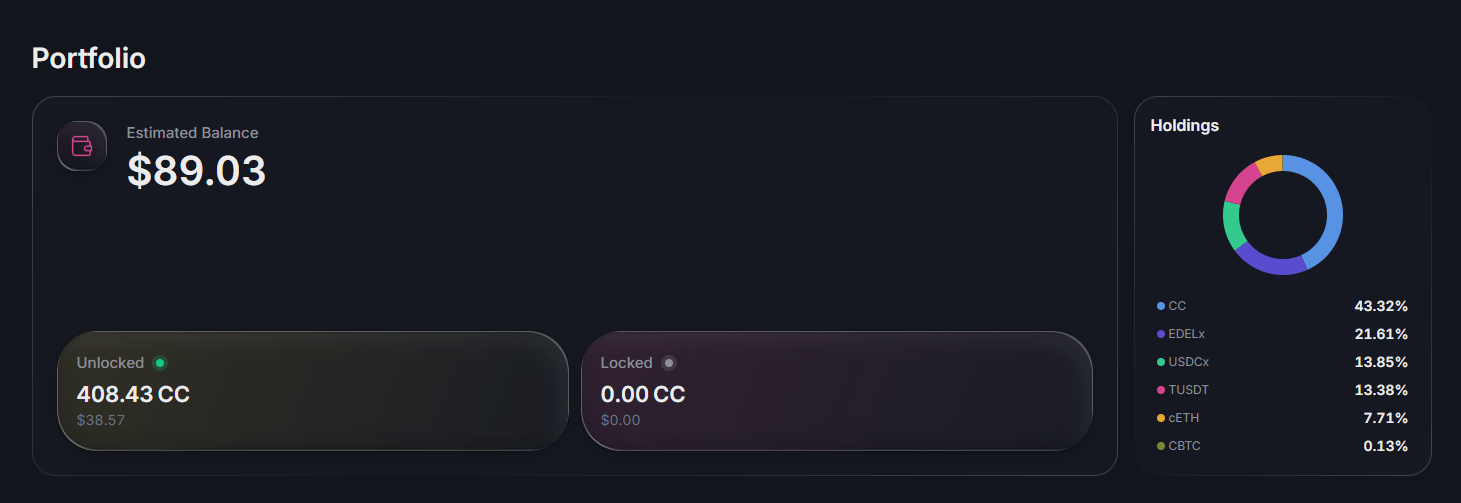 The Holdings chart gives you a quick visual breakdown of your Portfolio by asset.
See your asset distribution at a glance, making it easier to track portfolio allocation across supported assets.
# Unlocked and Locked Funds
Locked funds still belong to you. When assets participate in a DvP flow, the required amount can be reserved while the transaction progresses through settlement.
| Balance | Meaning | Available to use? |
| ------------ | ---------------------------------------------------------------------- | -------------------------- |
| **Unlocked** | The funds are available and can be used for new operations | Yes |
| **Locked** | The funds are temporarily reserved by a contract or settlement process | After the lock is released |
## How to Unlock Funds
In normal conditions, locked funds are released **automatically** when the corresponding flow completes, or the lock expires.
Occasionally, a lock may remain after its expected expiration because of a technical issue. In this case, Silvana provides a manual unlock flow for eligible funds.
Open Portfolio → Assets, expand the relevant asset, and find the balance or contract associated with the locked amount.
The system normally releases the funds automatically. Manual unlocking becomes relevant only when the lock remains after its expiration window.
When manual unlocking is available, use the **Unlock button** for the locked funds.
Silvana creates the unlock transaction and sends an approval request to your connected wallet. Review the request and sign it in the wallet.
Once the unlock transaction completes, the released amount becomes available under **Unlocked** and can be used again.
# Assets
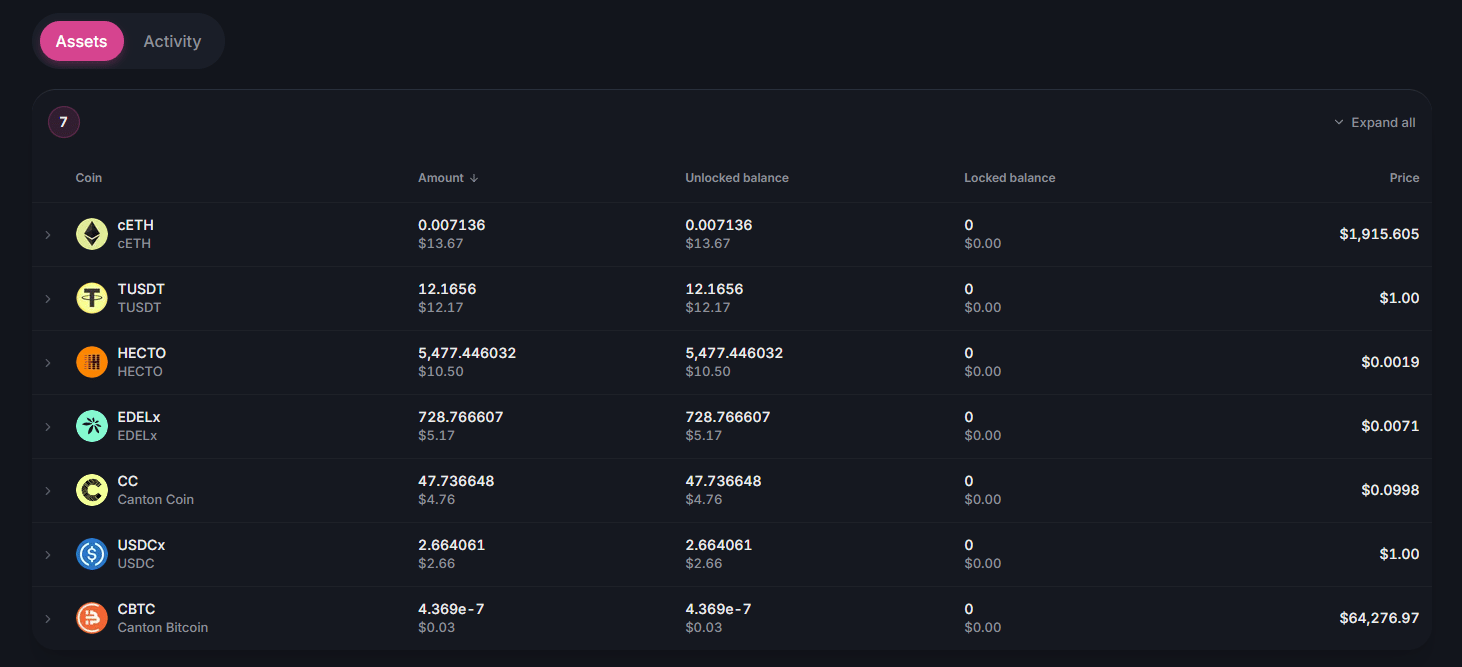
The **Assets** tab gives you a detailed view behind the Portfolio overview.
Here you can inspect each asset individually, including its total amount and how that balance is divided between Unlocked and Locked funds.
The Holdings chart gives you a quick visual breakdown of your Portfolio by asset.
See your asset distribution at a glance, making it easier to track portfolio allocation across supported assets.
# Unlocked and Locked Funds
Locked funds still belong to you. When assets participate in a DvP flow, the required amount can be reserved while the transaction progresses through settlement.
| Balance | Meaning | Available to use? |
| ------------ | ---------------------------------------------------------------------- | -------------------------- |
| **Unlocked** | The funds are available and can be used for new operations | Yes |
| **Locked** | The funds are temporarily reserved by a contract or settlement process | After the lock is released |
## How to Unlock Funds
In normal conditions, locked funds are released **automatically** when the corresponding flow completes, or the lock expires.
Occasionally, a lock may remain after its expected expiration because of a technical issue. In this case, Silvana provides a manual unlock flow for eligible funds.
Open Portfolio → Assets, expand the relevant asset, and find the balance or contract associated with the locked amount.
The system normally releases the funds automatically. Manual unlocking becomes relevant only when the lock remains after its expiration window.
When manual unlocking is available, use the **Unlock button** for the locked funds.
Silvana creates the unlock transaction and sends an approval request to your connected wallet. Review the request and sign it in the wallet.
Once the unlock transaction completes, the released amount becomes available under **Unlocked** and can be used again.
# Assets
The **Assets** tab gives you a detailed view behind the Portfolio overview.
Here you can inspect each asset individually, including its total amount and how that balance is divided between Unlocked and Locked funds.
 # Activity
Switch to **Activity** when you want to see what has already happened with your assets.
Each entry shows the operation type, assets and amounts, settlement status, and time.
# Activity
Switch to **Activity** when you want to see what has already happened with your assets.
Each entry shows the operation type, assets and amounts, settlement status, and time.
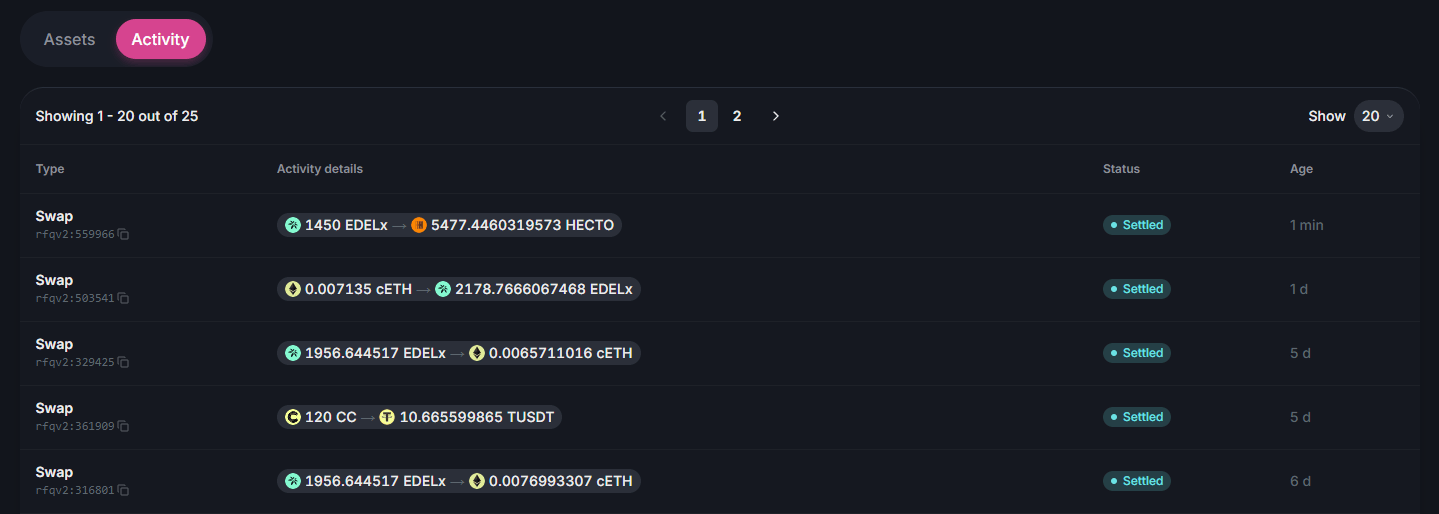 A **settled** status means that the corresponding operation completed successfully, helping you review previous trades and confirm whether a recent operation has reached final settlement.